
Development/Tutorials/Debugging/Debugging on MS Windows: Difference between revisions
| Line 9: | Line 9: | ||
To debug kioslaves: | To debug kioslaves: | ||
#set the KDE_SLAVE_DEBUG_WAIT environment variable in a current cmd.exe shell to the name of the kioslave's protocol (the first parameter of KIO::SlaveBase() constructor), e.g.<pre>set KDE_SLAVE_DEBUG_WAIT=file</pre> | #set the KDE_SLAVE_DEBUG_WAIT environment variable in a current cmd.exe shell to the name of the kioslave's protocol (the first parameter of KIO::SlaveBase() constructor), e.g.<pre>set KDE_SLAVE_DEBUG_WAIT=file</pre> | ||
# | #terminate <tt>klauncher</tt> process so it can be restarted | ||
{{Note|For example, set the variable to 'file' for the kio_file slave, '''but''' set it to 'smtps' for the kio_smtp is you want to debug smtp protocol secured with SSL.}} | {{Note|For example, set the variable to 'file' for the kio_file slave, '''but''' set it to 'smtps' for the kio_smtp is you want to debug smtp protocol secured with SSL.}} | ||
Revision as of 13:19, 31 January 2008
General Hints
Debugging with DebugView
Debug messages (logs) generated by kDebug() and kWarning() are not visible on MS Windows unless application is compiled in so-called CONSOLE subsystem. To show these messages also in WINDOWS subsystem, you can use DebugView tool, coming from SysInternals (currently acquired by Microsoft). The tool offers searching in logs, filtering and saving them to file.
Debugging kioslaves
kioslaves on windows are started by klauncher (or kio) as separate kioslave processes. The kioslave executable then loads the related kioslave dll dynamically.
To debug kioslaves:
- set the KDE_SLAVE_DEBUG_WAIT environment variable in a current cmd.exe shell to the name of the kioslave's protocol (the first parameter of KIO::SlaveBase() constructor), e.g.
set KDE_SLAVE_DEBUG_WAIT=file
- terminate klauncher process so it can be restarted
If the kioslave is requested the next time, a debugger will be started and attached to the kioslave process immediatly before the kioslave's kdemain() function.
On mingw platform gdb is launched and connected to the kioslave process. On msvc platforms the currently installed just-in-time debugger is used. This may be msvc's IDE or the windbg debugger. The latter could be set as jit-debugger by running 'windbg -I' command.
You may inspect kioslave sources [1] for more informations.
MS Visual Studio hints
Using MS Visual Studio environment for just debugging
Let's assume you're using command line tools (typically CMake) and want to use MS Visual Studio environment for just debugging. You don't need to create msvc project for your KDE application to be able to start debugging.
- compile and working executable version of your appliation (compiled in debug mode)
- run msvc environment
- execute File->Open project
- pick your exe file in the file window
- you can set command line arguments as usual, by pick Project->...Properties command and enter all of them it in Command Arguments field
- if you have libraries placed in other directories than your application's .exe file, and you want to step into these libraries' source code while debugging, pick Project->...Properties command and enter paths to these directories in Symbol Path field
- hit F5 to run the application start the application or F10 to start step by step
- all debugging functions like setting breakpoints will be available, so you can open source code in the integrated editor and press F9 where needed
- you can even edit your source code but to compile it, do it with your external, command line tools. You cannot compile the application in the msvc environment because you have not defined a project file
- before compiling your application, stop debugging session to unlock binaries; no need to close msvc window
- after compilation you can start debugging again
- on exit you will be asked to save .sln file (so-called solution file) with your debugging session -- do it and you will be able just to click the .sln file to start your debugging again
- it's recommended to save the .sln file in the .exe file directory
- next time you will run msvc environment, you can see name of your application's .sln file in File->Recent Projects submenu - you can click it to load your debugging session
Attaching to running application
If you have your application is already running, you can attach to it and then start debugging.
- run msvc environment
- execute Debug->processes
- select your from the processes list and click "Attach..."
- msvc environment will load your .sln file if it exists in the same directory as the .exe file, so your breakpoints set in previous session will be active again
- your program will stop on any breakpoint you have set
One-step attaching to running application
You can create a macro that automates the task. See [2].
Memory Values
If you are using the debug heap, memory is initialized and cleared with special values. Most interesting values are:
- 0xCDCDCDCD - Allocated in heap, but not initialized
- 0xDDDDDDDD - Released heap memory.
- 0xFDFDFDFD - "NoMansLand" fences automatically placed at boundary of heap memory. Should never be overwritten. If you do overwrite one, you're probably walking off the end of an array.
- 0xCCCCCCCC - Allocated on stack, but not initialized
See also: [3]
How to Not Step Into Functions in the Debugger
You'll probably want to avoind stepping into lower-level functions like QString constructors or operators while debugging step-by-step. Here's the detailed (unofficial) instruction for various msvc versions.
Enable automatic expanding of Qt data structures
From the msvc docs: "While debugging, Data Tips and items in the Watch and Variable windows are automatically expanded to show their most important elements. The expansion follows the format given by the rules in this file. You can add rules for your types or change the predefined rules." (example screen)
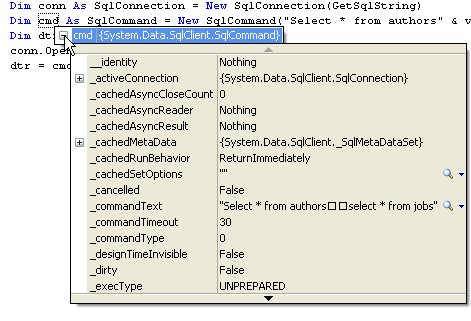
MSVC 2005: To add support for expanding Qt data structures like QString of QRect, edit {msvc_installation_directory}\Common7\Packages\Debugger\autoexp.dat file and paste definitions after [AutoExpand] line.