
Development/Tutorials/Plasma4/Ruby/Blinker
Abstract
This tutorial explains how to use SVG artwork in a Ruby plasmoid and how to interact with it in the simplest way possible.
Introduction
Perhaps the simplest SVG animation in Plasma is the visual emulation of a monochrome LCD panel as its elements do not move but are simply turned on and off to compose an understandable visual effect. In a racing game your car would have multiple positions at the base of the screen to give the effect of moving from one side of the road to the other, a traffic jam of cars into the distance shows up as a single car jumping around the road, giving you the idea that you can pass it if you race well. The simplest effect hower is blinking.
As we both do not yet know how to import and use an SVG picture we are going to build a very simple plasmoid and reuse an SVG from a non Ruby plasmoid. Then we'll ask a more experienced Ruby user to fill in the blanks, without forcing them to write a time consuming complete Plasma Ruby SVG tutorial.
To understand the initial set-up you should read an introductory tutorial like Simple Paste Applet.
Layout
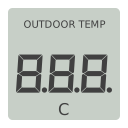
We'll be reusing some simple number display from the C++ coded plasma Weather Station, more specifically the SVGZ LCD temp. panel. And the plain plasma lay-out from the Simple Paste Applet:
- contents/
- code/
- main.rb
- images/
- lcd_panel.svgz
- code/
- metadata.desktop
Notice that we downloaded the zipped svg file and placed it in the contents/images folder as described on the Plasma Package convention, to make sure we also (double) click the svgz file and see an actual picture, if you see semi random text you mistakenly downloaded a web page of the KDE archive instead of the picture file.
The metadata.desktop file looks like this:
[Desktop Entry]
Name=Monochrome LCD demo
Comment=This is a very simplified applet written in Ruby
Icon=chronometer
Type=Service
ServiceTypes=Plasma/Applet

X-Plasma-API=ruby-script
X-Plasma-MainScript=code/main.rb

X-KDE-PluginInfo-Author=Me
X-KDE-PluginInfo-Email=[email protected]
X-KDE-PluginInfo-Name=blinker
X-KDE-PluginInfo-Version=0.1
X-KDE-PluginInfo-Website=http://plasma.kde.org/
X-KDE-PluginInfo-Category=Examples
X-KDE-PluginInfo-Depends=
X-KDE-PluginInfo-License=GPL
X-KDE-PluginInfo-EnabledByDefault=true
The main.rb initially looks like this:
require 'plasma_applet'

module Blinker
  class Main < PlasmaScripting::Applet
    def initialize parent
      super parent
    end

    def init
      set_minimum_size 128, 128
    end
  end
end
Inside the svg
The naming convention for the SVG elements is similar to that of the Qt API, but still each element has a unique ID. The three digits grouped as one is named:
temperature
And the ID of the three digits are, from left to right:
temperature:2
temperature:1
temperature:0
To create three zeros we use the elements named:
temperature:2:A        temperature:1:A        temperature:0:A
temperature:2:B        temperature:1:B        temperature:0:B
temperature:2:C        temperature:1:C        temperature:0:C
temperature:2:D        temperature:1:D        temperature:0:D
temperature:2:E        temperature:1:E        temperature:0:E
temperature:2:F        temperature:1:F        temperature:0:F
The list starts with the top one named A and goes clockwise. The elements we don't use, because that would create the figure eight, are the ones in the middle which are named:
temperature:2:G
temperature:1:G
temperature:0:G
There are also two usable decimal points in this SVG, which we don't use in this tutorial named:
temperature:2:DP
temperature:1:DP
But we start by importing the grey background with the rounded corners and using that as the shape of our plasmoid, it's ID has the name:
lcd_background
A messed up monochrome LCD plasmoid
When we ask Qt to paint the entire svg things would look quite right, but when we try to paint a number zero all the elements are painted on top of each other at the same location, oops what a mess. Qt sees each IDed element as a tiny svg to be drawn at our specified location, so all start at location 0, 0. Perhaps we could look up the location of a full digit 8 and tell Qt were to draw it, but then whenever an artists redesigns the elements they would have to change the codebase. Besides the individual elements don't have logically picked locations, they are cut from the digit at good looking locations. And when we resize the plasmoid we find out that the SVG rendering engine is not the same as the painting engine and digits move apart or together. Solving this would require lots of code.
So we conclude the SVG itself is only usable as a complete image stamp (like an icon or a picture button) but the SVG is laid out wrong for easy Qt painting. So before we move on we first go back one hundred years in the history of animation and place each element we want to paint on its own transparent sheet, each sheet starts at 0, 0 and all are the same size as the entire svg.
In this example I use the application in which the SVG was designed, Inkscape. I resize the contents of the SVG to make it fit on a plasmoid on its own, then I duplicate as many transparent fullframe rectangles as needed.
Then I open it in Karbon, as it has a nice hierarchy list, and place each rectangle next to each named ID, and join each into a group. This breaks up the existing hierarchy, as the new shape is larger then the old shape and so does no longer fit inside it anymore. I add _i to each individual ID name and give the new groups the old ID names.
A working monochrome LCD plasmoid
Now download Media:Lcd_panel_08.svg, the new svg, and place it inside the images folder of your plasma directory. The render engine will now render each element at its original location and the paint instructions are simple and reliable. In fact the following code looks a lot like the ruby-tiger example code, only now we paint multiple times to compose the wanted result:
require 'plasma_applet'

module Blinker
  class Main < PlasmaScripting::Applet

    def initialize parent
      super parent
    end

    def init
      set_minimum_size 128, 128
    end

    def init
      @svg = Plasma::Svg.new(self)
      @svg.imagePath = package.filePath("images", "Lcd_panel_08.svg")
    end

    def paintInterface(painter, option, contentsRect)
      @svg.resize(size())

      @svg.paint(painter, 0, 0, "lcd_background")
      sleep 0.5

      @svg.paint(painter, 0, 0, "temperature:0:A")
      @svg.paint(painter, 0, 0, "temperature:0:B")
      @svg.paint(painter, 0, 0, "temperature:0:C")
      @svg.paint(painter, 0, 0, "temperature:0:D")
      @svg.paint(painter, 0, 0, "temperature:0:E")
      @svg.paint(painter, 0, 0, "temperature:0:F")

      @svg.paint(painter, 0, 0, "temperature:1:A")
      @svg.paint(painter, 0, 0, "temperature:1:B")
      @svg.paint(painter, 0, 0, "temperature:1:C")
      @svg.paint(painter, 0, 0, "temperature:1:D")
      @svg.paint(painter, 0, 0, "temperature:1:E")
      @svg.paint(painter, 0, 0, "temperature:1:F")

      @svg.paint(painter, 0, 0, "temperature:2:A")
      @svg.paint(painter, 0, 0, "temperature:2:B")
      @svg.paint(painter, 0, 0, "temperature:2:C")
      @svg.paint(painter, 0, 0, "temperature:2:D")
      @svg.paint(painter, 0, 0, "temperature:2:E")
      @svg.paint(painter, 0, 0, "temperature:2:F")
    end

  end
end
That looks nice, but did you notice the plasmoid did not update the graphics after half a second? It seems all the code we write is part of the initialization of the plasmoid. The paint engine renders the lcd background, waits half a second, renders the 3 digits and only when completely finished does it paint everything onto the screen.
Rewriting this into a looping animation would only cause a never ending loop which makes sure our plasmoid never gets painted at all.
So how do we paint after the creation of the plasmoid?
The idea for our plasmoid is as follows: once created we repeat the following steps:
- clear the screen by drawing lcd_background again.
- wait 0.5 second
- draw the elements for three zeros
- wait 0.5 second
A blinking monochrome LCD plasmoid
After a more experienced Ruby programmer has expanded the code to include the SVG and to make the three zero digits blink on for half a second and then off for half a second, like an unset alarm clock, the code looks like this:
require 'plasma_applet'

module Blinker
  class Main < PlasmaScripting::Applet

  slots 'dataUpdated(QString, Plasma::DataEngine::Data)'

  def initialize parent
      super parent
    end

    def init
      @counter = -1
      @svg = Plasma::Svg.new(self)
      @svg.imagePath = package.filePath("images", "Lcd_panel_08.svg")
          connectToEngine()
    end

    def connectToEngine
      # Use 'dataEngine("ruby-time")' for the ruby version of the engine
      timeEngine = dataEngine("time")
      # timeEngine.connectSource("Local", self, 500, Plasma::AlignToMinute)
      timeEngine.connectSource("Local", self, 500, Plasma::NoAlignment)
    end

    def dataUpdated(source, data)
      update()
      @counter = @counter - 1
      @counter = @counter.abs
      @y = @counter * 200
    end

    def paintInterface(painter, option, contentsRect)
          puts "ENTER paintInterface, paint height is " + @y.to_s
      @svg.resize(size())

      @svg.paint(painter, 0, 0, "lcd_background")

      @svg.paint(painter, 0, @y, "temperature:0:A")
      @svg.paint(painter, 0, @y, "temperature:0:B")
      @svg.paint(painter, 0, @y, "temperature:0:C")
      @svg.paint(painter, 0, @y, "temperature:0:D")
      @svg.paint(painter, 0, @y, "temperature:0:E")
      @svg.paint(painter, 0, @y, "temperature:0:F")

      @svg.paint(painter, 0, @y, "temperature:1:A")
      @svg.paint(painter, 0, @y, "temperature:1:B")
      @svg.paint(painter, 0, @y, "temperature:1:C")
      @svg.paint(painter, 0, @y, "temperature:1:D")
      @svg.paint(painter, 0, @y, "temperature:1:E")
      @svg.paint(painter, 0, @y, "temperature:1:F")

      @svg.paint(painter, 0, @y, "temperature:2:A")
      @svg.paint(painter, 0, @y, "temperature:2:B")
      @svg.paint(painter, 0, @y, "temperature:2:C")
      @svg.paint(painter, 0, @y, "temperature:2:D")
      @svg.paint(painter, 0, @y, "temperature:2:E")
      @svg.paint(painter, 0, @y, "temperature:2:F")
    end

  end
end
Copy this piece of code and see that it works. Now resize your plasmoid while it runs (ouch) and play with other multiplication values to get to @y to see how that affects the code. Let's review the code in detail:
slots 'dataUpdated(QString, Plasma::DataEngine::Data)'
- Line 1: First we declare we want another slot that pokes our sleepy plasmoid awake. Another one, do we already have some? Yes, some slots are a given in plasma, like how our code gets a signal when the plasmoid is being resized.
def init
  @counter = -1
  @svg = Plasma::Svg.new(self)
  @svg.imagePath = package.filePath("images", "Lcd_panel_08.svg")
      connectToEngine()
end
- Line 2: Before our plasmoid is created we set our basic counter to -1, in Ruby this automatically means it is created as an integer type variable which can have negative values. The value -1.0 would have created a floating point variable instead. The @ sign in front makes it available outside this init definition.
- Line 3: The @svg variable for the SVG has to have its type specified, you should call it something more specific than just @svg if you use multiple svg files.
- Line 4: @svg has its 'value' filled with the SVG data. The file path is given as multiple values, you could use a terminal path description ("images/Lcd_panel_08.svg") as well but this way you'll never have to escape spaces in names.
- Line 5: To include the connectToEngine() defintition in our plasmoid initialization we call it here with nothing between the brackets as we have no values to pass along. It's a nice way to keep our init definition clean looking. Since it does not call to a Qt API we could rename it to anything, connect_to_engine() would be more readable.
def connectToEngine
  # Use 'dataEngine("ruby-time")' for the ruby version of the engine
  timeEngine = dataEngine("time")
  # timeEngine.connectSource("Local", self, 500, Plasma::AlignToMinute)
  timeEngine.connectSource("Local", self, 500, Plasma::NoAlignment)
end
The idea of us pauzing our code is a bad one, we should always ask plasma to give us a signal to move on (by using Qt::Timer), it even has a ruby specific engine so that we can import our basic Ruby tutorials. This way we avoid blocking user interactions, even when we want total control over a game the user should be able to resize all things plasma to switch to a phone call and the plasma team should be able to improve the perceived speed of plasmoids.
- Line 3: We use the data engine time so we can work towards a clock, this is an API call so it must be named dataEngine("time") or data_engine("time").
- Line 4: Align to minute would give us a clock which would change each time we see other clocks change.
- Line 5: But for our fast blinking to work we need to ask for an unaligned signal every 500 milliseconds (equals half a second) or whenever plasma is able under stress. The method connect_source is also an API call not be renamed.
def dataUpdated(source, data)
  update()
  @counter = @counter - 1
  @counter = @counter.abs
  @y = @counter * 200
end
- Line 1: The dataUpdated definition is an API call so we can't rename it at all, this definition gets run whenever the data engine updates the data in the slot. The text between brackets (source, data) is just a helpful reminder on usage, you could rename to anything informative, but the single comma must remain as it signifies that there are two arguments to be given.
- Line 2: The update() is the plasma API call to repaint the plasmoid content, it makes the code jump to paintInterface. We can copy and paste this whole definition thus far into most plasmoids.
- Line 3: The @counter variable is what we added to get our plasmoid to do something different on each 'go do something' signal.
- Line 4: When @counter goes below zero we make the negative number positive again with the 'get the absolute value' function of Ruby. This makes sure that the next round it will go from 1 to zero.
- Line 5: With the @y variable we will set the paint height of the digits. By painting them visibly at zero and in the next round outside the visible part of the plasmoid at 200 they will appear to blink as we move them around. Plasma however does not cache the rendered SVGs yet so we are still rendering and repainting each round. This is why many plasmoids get slow when you make them really large, this situation can of course improve in the future.
def paintInterface(painter, option, contentsRect)
      puts "ENTER paintInterface, paint height is " + @y.to_s
  @svg.resize(size())

  @svg.paint(painter, 0, 0, "lcd_background")
The paintInterface is another API call.
- Line 2: To see if and when our refresh is actually working we put a string on the terminal output, we also want to know if our counter logic actually works so we tell that to ourselves as well. The puts function is a useful tool to see how well your code is running whenever looking at the plasma repainting is unhelpful. This puts is so fast paced that you may want to comment out the code with a #. Other puts may be kept alive in your own code as it shows you after what point the plasmoid stalls when it unexpectedly does.
- Line 3: The resize function is the signal part of a slot belonging to paintInterface which gets signaled when the plasmoid is being resized. It states "@svg you should resize yourself to the current values of size". No values of size are given as plasma itself updates that variable while the plasmoid is being resized. As we used proper plasma dataEngines our plasmoid gets repainted live while being resized, on decently fast computers that is. Again we explain that on slow computers the live repainting doesn't slow or stall the resizing, it just skips some repaints and everything remains usable from the user perspective, that is why we never try to hardlock or pause our code ourselves in plasma.
- Line 5: The elements are rendered on top of each other in the listed order and when all are done they are painted as one to the screenbuffer. Try out moving the line of lcd_background further down the list to see how it affects the plasmoid.
Getting the data from a data engine signal
...To be completed...
This is the base we need to program our own monochrome LCD plasmoids. In a next tutorial I'll explain how to create them with an SVG drawing application, as I've already played with SVG drawing. If you've made a nice LCD wristwatch or LCD game simulation based on this codebase yourself, why not log in and place a link to it here below. Don't forget to upload it to kde-look.org so others can download it with plasma's build-in add widgets function.